Optimal Access · Docs
Kurator Popup Web Clipper
To add links to your Kurator app, click the Kurator icon in your browser toolbar. Be sure to pin this extension from your browser's Extension menu.
Kurator Popup, Save any page your way
The Kurator popup in your toolbar is an AI-powered web clipper that saves any page you open in your browser, including pages you're signed into, like LinkedIn posts, Reddit threads, and your Claude, ChatGPT and Gemini chats.
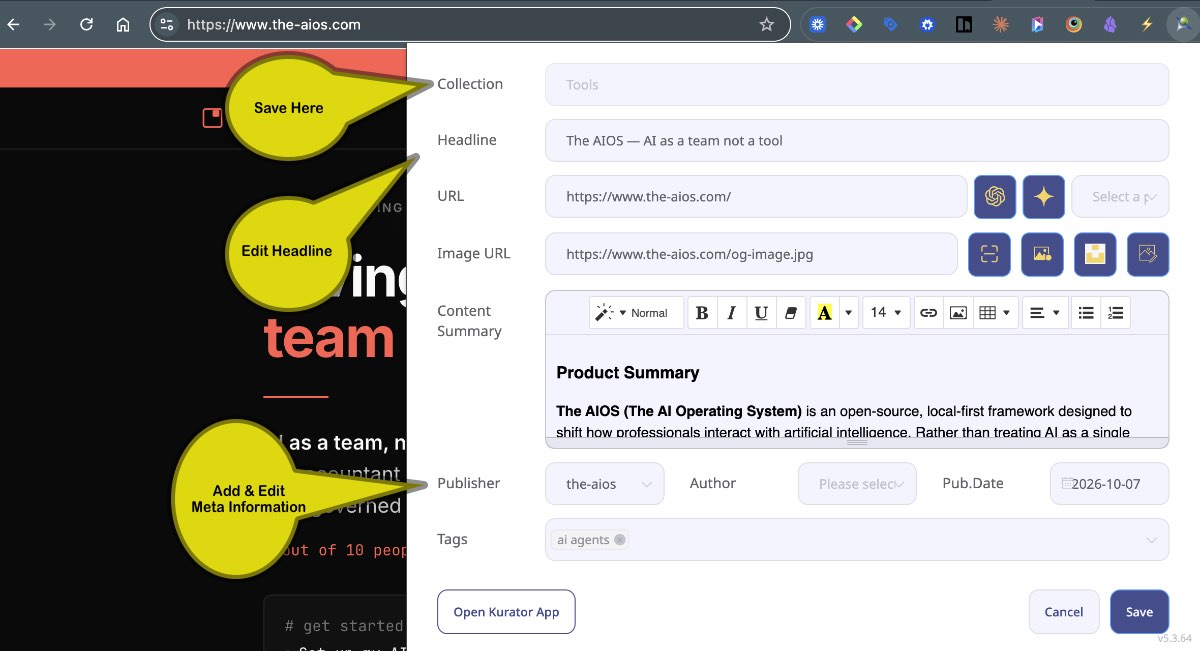
When you click the Kurator icon, it captures the page as you see it and automatically fills in the key details: headline, author, publisher and date. You can review and edit anything before saving.
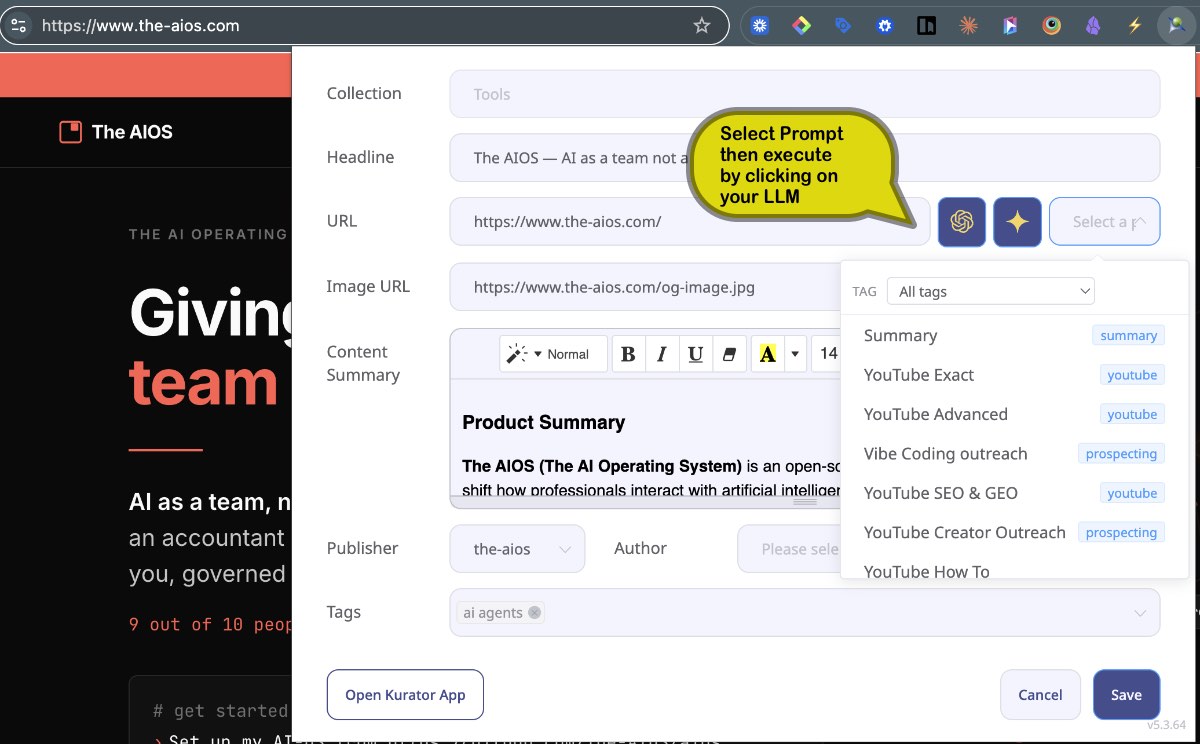
Choose one of your custom prompts, and Kurator reads the page and writes the description exactly the way you asked: a summary, key takeaways, a competitor teardown, or notes in your own format. Each run uses only that page's content, so results stay consistent and unbiased.
Add your own content tags, pick a folder, and save. Everything you keep is searchable by headline, description, author, publisher and tag, and ready to reuse in Claude, ChatGPT, NotebookLM and KChat.
Kurator Popup Prompts
What are Kurator custom prompts?
Kurator is a browser extension for AI research. With custom prompts, you write instructions once, such as "summarize the key claims," "extract action items" or "assess this post as a sales lead," and run them on any page you save. The result is stored with the link as a structured description you can search, organize and reuse.
How is this different from a web clipper?
Most clippers save the page or generate a generic summary. Kurator runs the prompt you chose, so the same page can become a research note, a competitor teardown or an outreach brief, depending on your goal.
What pages can Kurator read?
Kurator captures the page as rendered in your browser. That includes pages you're signed into: LinkedIn posts, Reddit threads with comments, YouTube videos (via transcript), PDFs, and conversations in Claude, ChatGPT and Gemini.
Does my chat history affect the result?
No. Each run uses only the content of that page and your prompt. Rerun the prompt any time the page changes, for example after you continue an AI chat.
Which AI model runs my prompts?
You add your own Gemini or OpenAI API key under AI Settings, where you also create and reorder your prompts.
What can I do with what I've saved?
Organize items into folders and tags, find them with Global Search, and reuse them in Claude or ChatGPT through the Kurator MCP connector. You can also sync folders to NotebookLM, power a KChat assistant, or publish them to a website.
Kurator Popup Image Capture
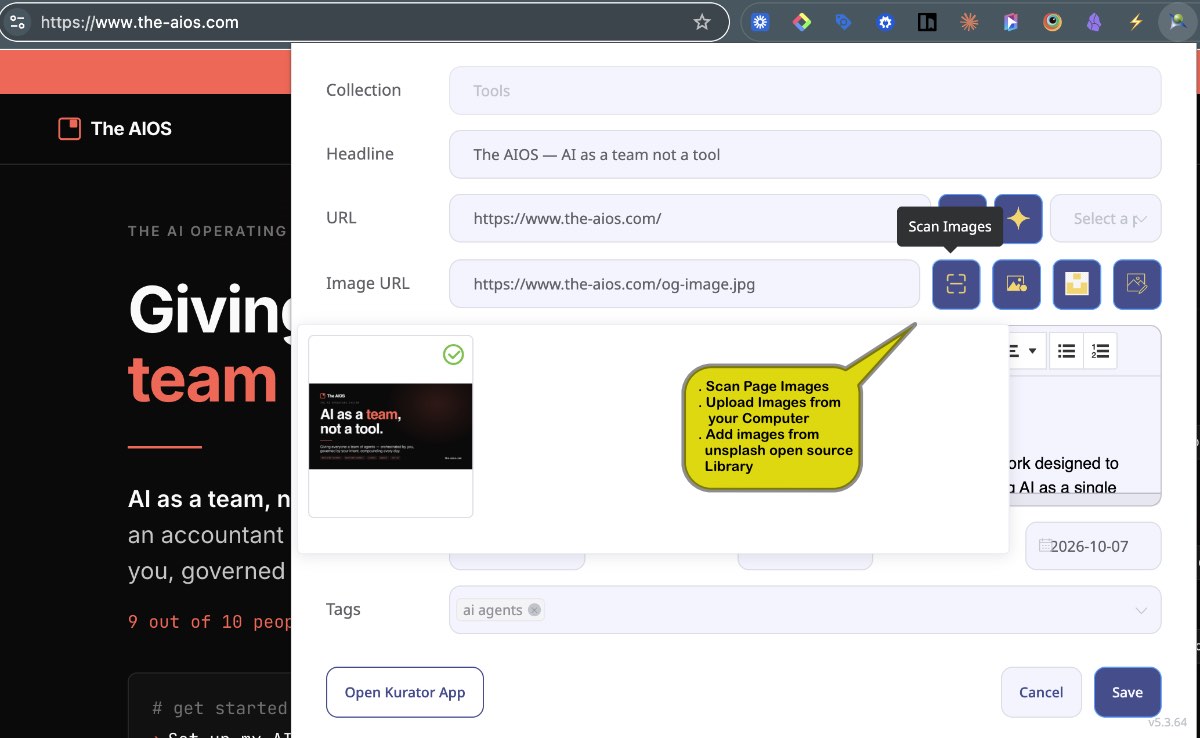
Every post you save in Kurator can carry a featured image, which shows up in your library and on any site you publish to. The popup gives you three ways to choose one:
- Pick from the page. Kurator scans the images on the page you're saving and lets you select one.
- Upload your own. Add an image from your computer, and Kurator stores it in the cloud with your post. Use this for publishing: some websites block their images from being displayed elsewhere, and many images are copyrighted. Uploading an image you own or have rights to keeps your published posts reliable and safe to use.
- Search Unsplash. Find a free, high-quality photo from the Unsplash library and attach it to your post.