
The Ultimate NotebookLM Workflow: How Kurator Outperforms the Competition
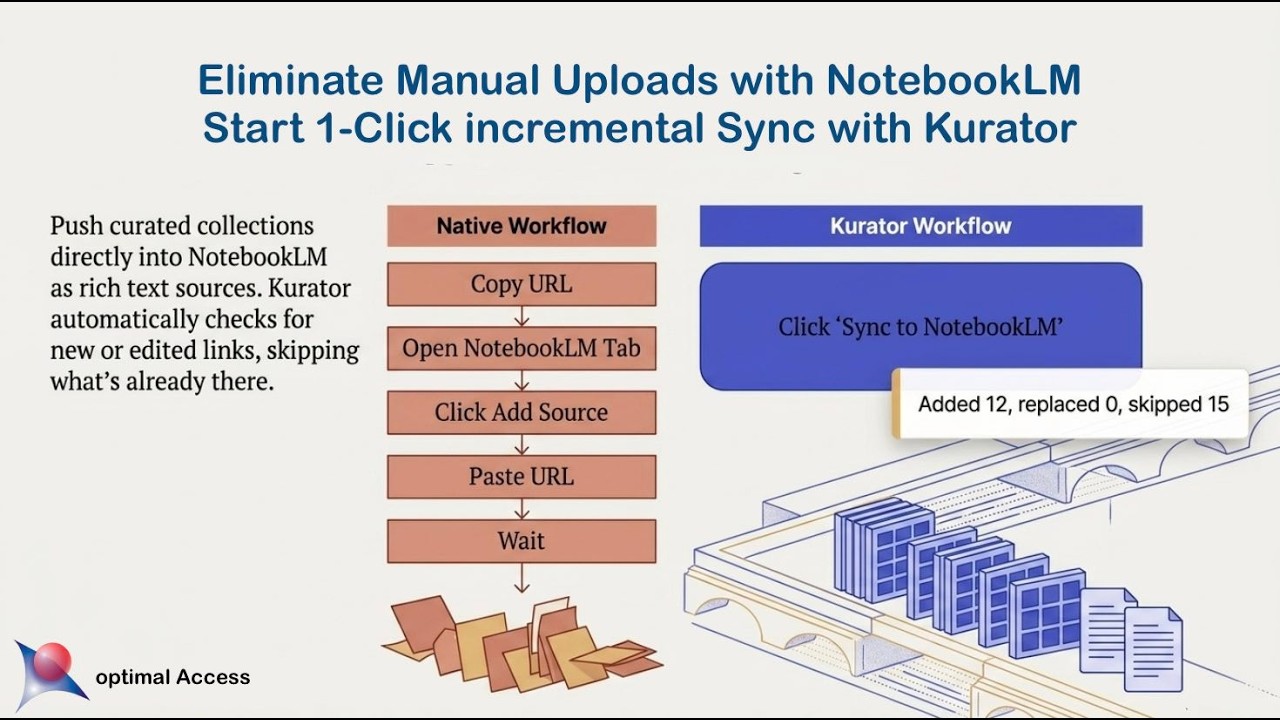
If you use Google’s NotebookLM for serious research, you already know the frustration. The AI’s ability to analyze documents is incredible, but getting your research into the tool is a tedious, manual process.
Notebooks lack native tags, forcing your sources into a chaotic “flat list”. And when you hit the strict 50-source limit on the free tier, your workflow hits a brick wall.
To solve these problems, a massive ecosystem of Chrome extensions and third-party tools has emerged. But not all tools are created equal.
Here is a deep dive into how Kurator acts as a premium data preparation hub, what features make it essential, and how it separates itself from every other competitor on the market.
Kurator: Feed Your AI High-Signal Intelligence
Most tools treat NotebookLM like a digital trash can for raw links. Kurator treats it like a professional memory. By acting as a bridge between your browser and NotebookLM, Kurator focuses on structuring your inputs so the AI can give you genius-level outputs.
1. Structured Capture and Custom GPTs Instead of blindly saving a messy URL, Kurator’s capture tool uses a structured Creator Schema, capturing the Headline, Publisher, Author, Date, custom Content Tags, and Description. Crucially, Kurator lets you run Custom GPTs at the point of capture.
For example, you can use the YouTube Transcriber GPT to automatically strip out filler words and add section headlines to a video before you save it.
2. 1-Click Incremental Sync Kurator eliminates manual data entry. Once you curate a “Published Collection” folder in Kurator, you simply click “Sync to NotebookLM”. Kurator pushes the title, URL, tags, custom descriptions, and clean scraped text directly into your AI workspace. It is also intelligent: if you add new links tomorrow, clicking sync will only push the new sources, ensuring you never create duplicates.
3. Dynamic Metadata Dropdowns (Solving the Flat List) Because NotebookLM’s native search bar only searches full-text content, large projects turn into a digital laundry pile. Kurator fixes this by injecting three dynamic dropdown menus—Content tag, Publisher, and Author—directly into the NotebookLM interface, right below the search bar. This allows you to visually filter your 50 sources based on your custom metadata, letting you isolate specific research and speak directly to a targeted subset of posts.
4. Hacking the 50-Source Limit Instead of cramming everything into one notebook, Kurator acts as an unlimited external storage hub. You can set a tag filter in Kurator’s Card view, and when you hit “Sync,” Kurator will only push that highly specific subset of links to your notebook. This allows you to effortlessly split a massive research project across multiple notebooks without moving any actual files.
5. Research Once, Reuse Everywhere Kurator isn’t just for NotebookLM. The exact same curated collection can be instantly published as an embeddable gallery on WordPress, turned into a custom RSS feed, or used to power KChat, an AI conversational chatbot.





The Competitor Landscape: Why Kurator Stands Apart
While Kurator focuses on data preparation and metadata injection, the rest of the Chrome extension ecosystem generally falls into three distinct categories. Here is how Kurator separates itself from the pack.
Category 1: The “Dashboard Organizers”
Competitors: Bookshelf, FolderLM, NotebookLM Folder Manager, NotebookLM Folders, NotebookLM Enhancer
These extensions primarily focus on NotebookLM’s homepage. They offer fantastic visual tweaks like drag-and-drop folders, subfolders, color-coding, and minimalist designs (like NotebookLM Folder Manager’s Sumi-e aesthetics) to help you organize dozens of separate notebooks.
- How Kurator Separates Itself: These tools organize the outside of your notebooks. Once you click into a notebook, you are still faced with a messy, flat list of 50 sources. Kurator organizes the inside. By injecting dynamic Content Tag, Publisher, and Author dropdowns directly into your source list, Kurator gives you deep metadata filtering over your actual context window, allowing you to control exactly what the AI reads.
Category 2: The “Bulk Scrapers & Importers”
Competitors: ExtendLM, NotebookLM Source Helper, NotebookLM Tools, NotebookLM Extension, NotebookLM Source Uploader
These tools are built for sheer volume and speed. They market the ability to bypass paywalls (like ScienceDirect), scrape entire YouTube channels or Apple Podcasts playlists, download RSS feeds, and dump 50 open browser tabs into NotebookLM in a matter of seconds.
- How Kurator Separates Itself: The problem with dumping 50 raw, unstructured web pages into NotebookLM is that it creates a “data swamp,” overwhelming the AI’s Retrieval-Augmented Generation (RAG) system and leading to degraded, generic answers. Kurator positions itself against this “garbage in, garbage out” approach. Instead of bulk-dumping raw noise, Kurator uses Custom GPTs to clean, summarize, and structure the data into its Creator Schema before it ever reaches NotebookLM. Kurator prioritizes high-signal data over raw volume.
Category 3: “Project Management & Automation Overhauls”
Competitors: Notebook-Nest (NotebookLM Pro Tree), NotebookLM All-in-One Productivity Tool, NotebookLM Hub, notebooklm-mcp
These open-source tools and robust extensions try to turn NotebookLM into a full-fledged productivity suite. Notebook-Nest adds integrated task managers, priority flags, and the ability to pop out notes into multiple floating windows. NotebookLM Hub adds persistent sidebars and custom prompt libraries. notebooklm-mcp even allows developers to programmatically add sources using API-like browser automation.
- How Kurator Separates Itself: While these tools are excellent for active task execution within Google’s walled garden, they lock your workflow completely into NotebookLM. Kurator separates itself by being an independent, open ecosystem. Your structured research lives in Kurator, meaning if you ever want to use a different AI tool (like Claude Projects), power a website chatbot, or share an RSS feed with your marketing team, your data is completely portable and ready to be reused anywhere.
Why This Matters
In the age of AI, we are no longer suffering from a lack of information; we are suffering from “information obesity”.
If you feed NotebookLM chaotic, unstructured data, you are treating it like a digital junk drawer. The AI will struggle to find accurate insights, and your Audio Overviews will suffer from poor quality.
The tools that simply help you dump more raw tabs into NotebookLM faster are only accelerating the chaos. Kurator matters because it acknowledges that the output is only ever as good as the input.
By shifting your workflow to template-based knowledge management—using Custom GPTs to extract intent, stripping out filler words, and relying on precise content tags—you don’t just save hours of manual copy-pasting. You build a structured, scalable professional memory. When you control your inputs with Kurator, you can finally start trusting your AI’s answers again.