
Does Your LLM Remember Past Conversations? Why AI Memory Is Not the Same as a Second Brain
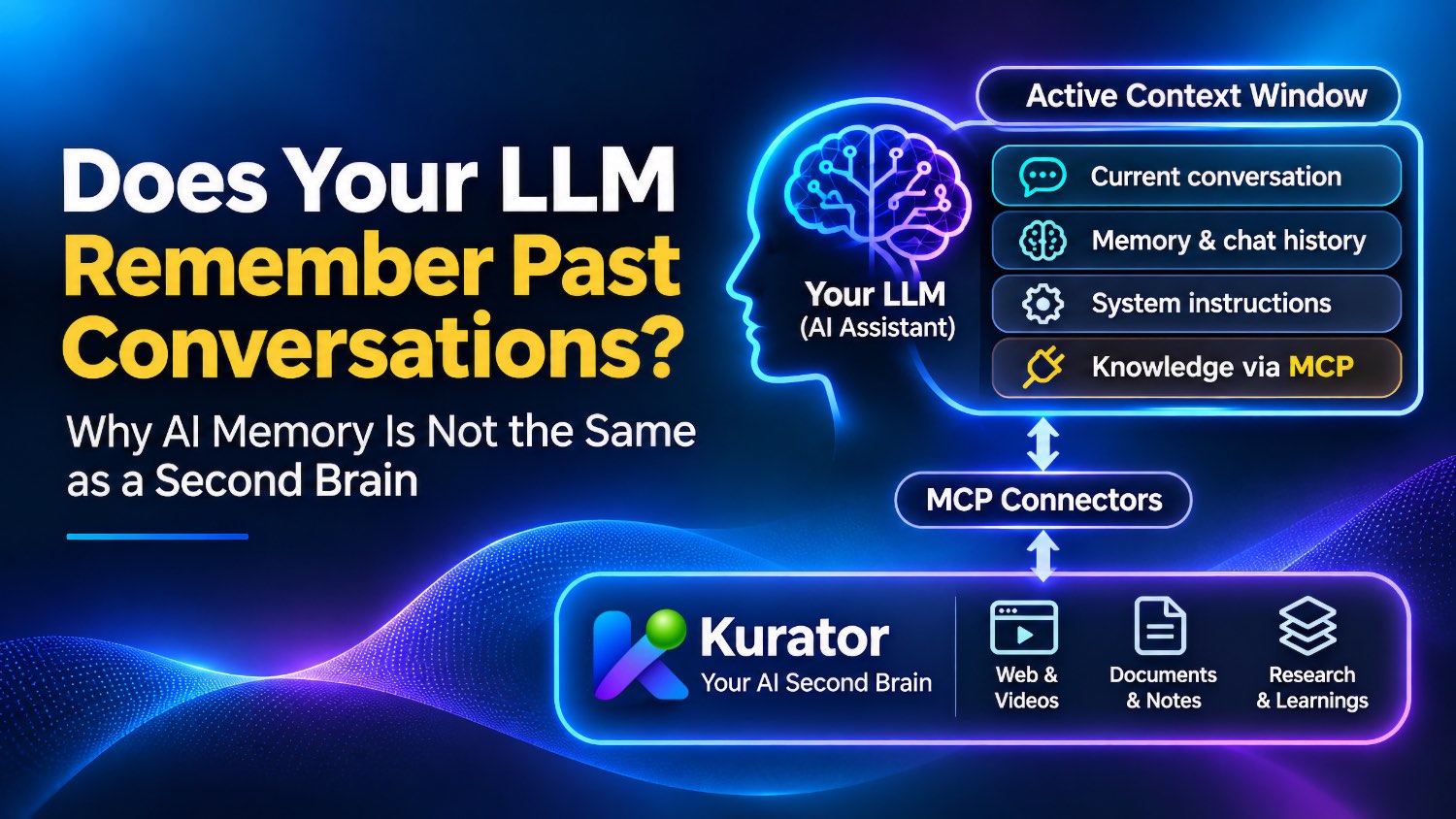
The short answer is Yes.
An LLM can retrieve information from your previous conversations, but that is different from having those conversations inside the context window.
This distinction is fundamental to understanding how AI memory works, and it also explains where external memory like Kurator can add significant value.
There are really three different mechanisms involved:
-
Context window: What the AI can actively work with during the current conversation.
-
Memory and conversation retrieval: How your LLM can bring information from previous conversations into a new one.
-
External knowledge retrieval: How a tool like Kurator can supply structured, persistent information from outside ChatGPT.
1. How an LLM context window works
Think of the context window as the LLM’s working memory.
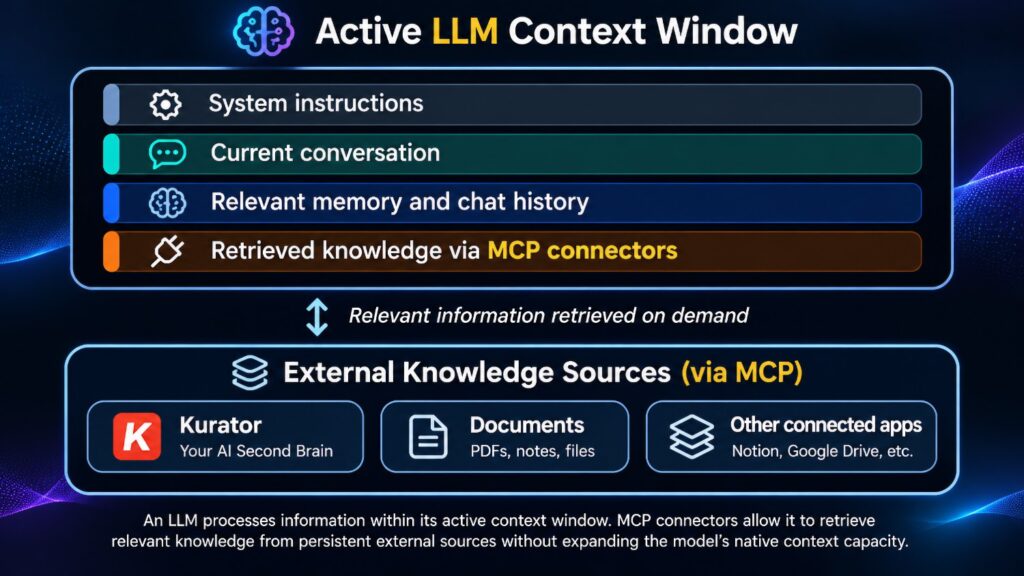
When you are talking to your AI assistant, the model processes the information supplied within a limited number of tokens.
That can include the current conversation, instructions, selected memories, and retrieved material.
A few important points:
-
The context window has a finite capacity.
-
It doesn’t automatically contain every conversation you’ve ever had.
-
As conversations grow, older material may be summarized, truncated, or otherwise excluded from active context.
-
When a response is generated, the model uses the context available at that moment.
The important distinction: A large context window does not necessarily mean long-term memory.
It means the AI can process more information at once.
2. How an LLM remembers your previous conversations
I am sure you have noticed that your AI chatbot sometimes knows what you discussed weeks or months ago, even when you start a completely new chat.
That’s because your LLM can provide relevant information through memory and conversation-history retrieval.
For example, my LLM has information on my product Kurator through my previous conversations as follows:
-
Kurator’s positioning as an AI second brain.
-
Comparisons of Kurator and Obsidian.
-
My research on why people build second brains.
-
My Kurator Wiki structure, including Skills and Learnings.
-
My recent work on tag networks and MCP integration.
That doesn’t mean that my AI has all those conversations open.
There are two particularly useful mechanisms.
Memory: ChatGPT, Gemini, Claude and other LLM’s maintain selected information about your interests, projects, preferences, and prior decisions. This is generally condensed rather than a verbatim record.
Conversation retrieval: When you ask about something previously discussed, your LLM may be able to search for relevant past conversations and recover more specific information.
For instance, if I ask, “What were the three pain points we identified for building a second brain?” my LLM may retrieve the earlier discussion rather than reconstruct the answer from general knowledge.
However, neither mechanism guarantees that every detail, source, quote, or decision will be recovered.
This is where the difference between remembering a conclusion and retrieving the evidence behind that conclusion becomes important.
3. How Kurator enhances the context
Kurator introduces something different: a persistent knowledge base that you organize and control, which multiple AI systems can retrieve from.
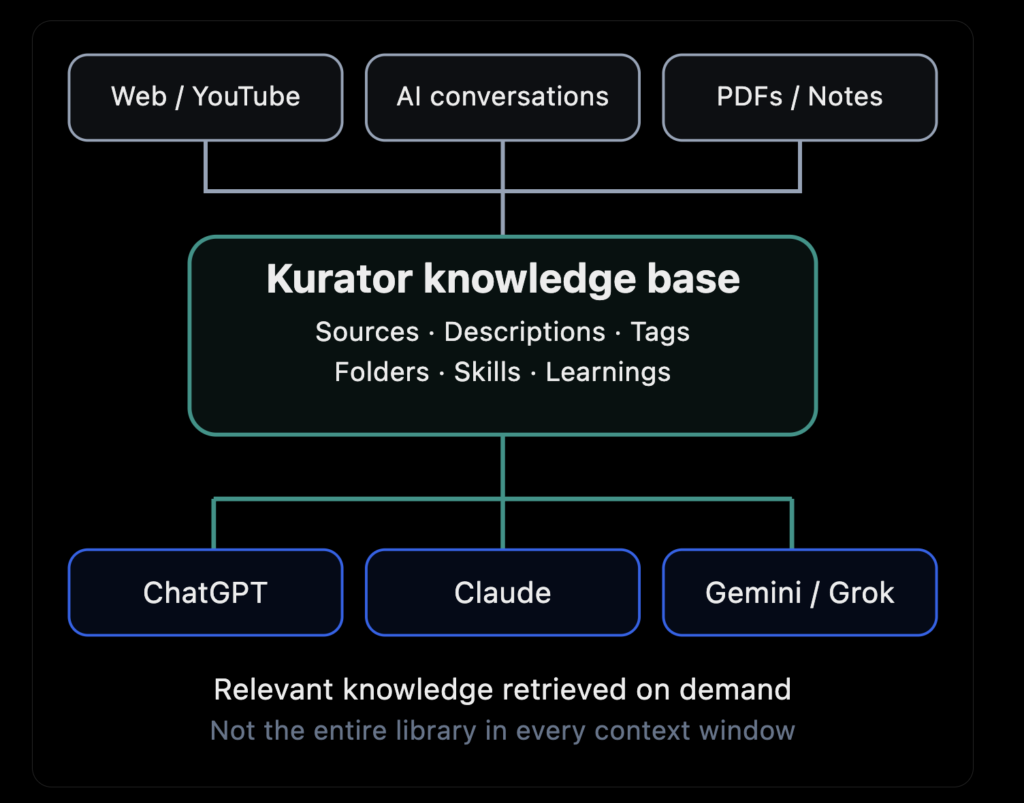
Kurator is a web clipper that structures information using your own custom prompt and optimizes it for retrieval for your LLM.
It connects to Claude, Gemini, ChatGPT, and Grok through MCP connectors.
The main advantages of this external memory are:
-
Persistence: Knowledge is retained independently of a particular AI conversation.
-
Structure: You can organize information by subject, tags, folders, and metadata.
-
Source provenance: You can retain links to the original articles, videos, and other sources.
-
Portability: Your knowledge can be accessed from different AI assistants through supported connectors.
-
Reusable instructions: Your Wiki Skills can tell different AI systems how to work with the information.
But there’s a subtle distinction: Kurator doesn’t increase the model’s native context window. It improves what information gets brought into that window and how reliably you can find it.
4. A real example from our previous conversations
Let me provide my example by showing how I started my research on this post.
I asked chatGPT:
“I want to ask a question regarding your context window. First of all, can you see the context of different chats? Generally, if I ask a question that I’ve talked about before, it seems like you can retrieve that information. How does that really work, and how does a tool like Kurator enhance the context?“
To answer the question, chatGPT retrieved information from my earlier discussions about second-brain pain points.
One discussion from November 4–5 identified three motivations:
Preserve research, conversations, insights, and decisions instead of losing them across applications.
Connect information from multiple sources and develop useful knowledge.
Make that knowledge available to AI for writing, research, decisions, and automation.
Notice what happened: ChatGPT recovered those conclusions without me reopening or referencing the original conversation.
That’s a useful LLM capability.
But suppose I asked:
“Which specific YouTube videos led us to conclude that people are building second brains to recover lost research, and what evidence did each presenter provide?“
ChatGPt’s remembered summary would not necessarily contain those details.
With Kurator, I can always address specific folders and contents, like look at YouTube videos with the “AI memory” tag in the “technical discussions” folder and who specifically uses their 2nd brain to recover lost research.
That’s a substantially different capability.
5. Your LLM Memory versus Kurator
| Capability | LLM memory/history | Kurator + MCP |
|---|---|---|
| Recall earlier discussions | Yes, selectively | Yes, for captured records |
| Preserve original source links | Not guaranteed | Yes |
| User-defined tags and folders | Limited | Yes |
| Use across different LLMs | Not automatically | Yes, with connectors |
| Custom analysis at capture | Not generally automatic | Yes |
| Explicit reusable Skills | Via instructions or other features | Via Kurator Wiki |
| Complete recall of everything | No | Depends on what was saved and retrieved |
Neither system is infallible. Kurator still depends on retrieval quality, source completeness, and how accurately the AI interprets the retrieved information.
6. How Your LLM interfaces with Kurator
A practical AI second-brain architecture contains three complementary layers.
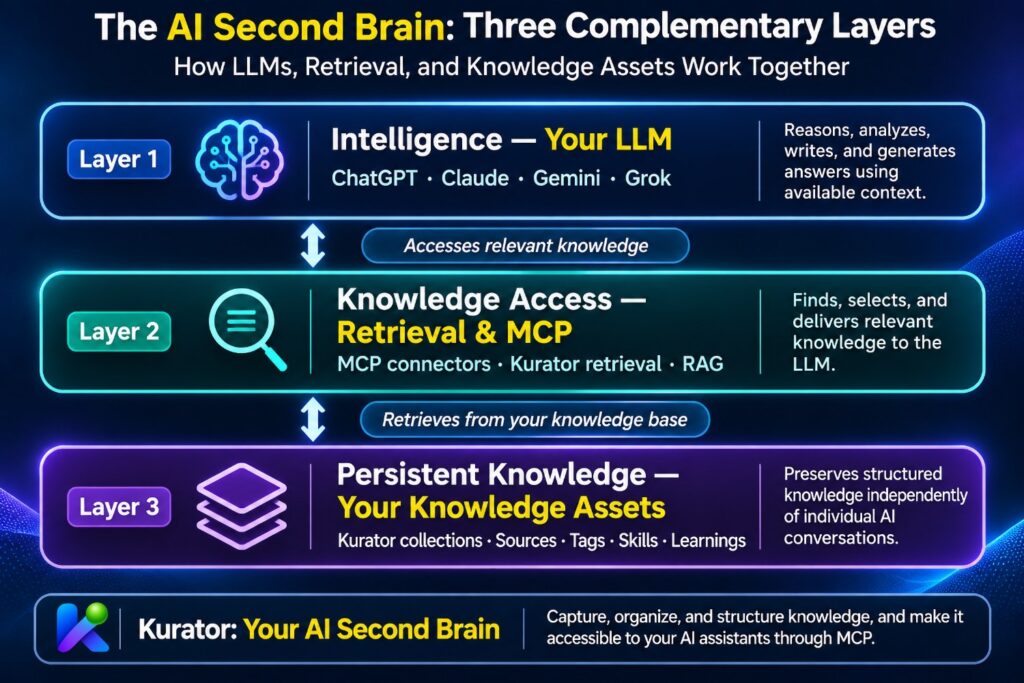
Kurator MCP Connector
The Kurator MCP connector can read from and write to your Kurator memory.
You can ask your LLM to conduct research and save it to a specific folder—or create a new one—while applying a custom prompt to generate the description.
This capability provides Layer 2 of the architecture: access and knowledge retrieval.
Layer 3 turns everything you capture into persistent memory that can be addressed as a resource-backed knowledge source for content creation and analysis.
In addition to your stored knowledge, you can build your own Kurator wiki introducing another valuable capability: it can provide not just what the AI should know, but how the AI should work.
For example, a Skill could instruct ChatGPT or Claude to read the relevant research, compare sources, distinguish evidence from interpretation, and produce a particular output.
That creates consistency across AI systems, provided they retrieve and follow the same instructions.
Frequently Asked Questions About LLM Memory and AI Second Brains
Can an LLM remember previous conversations?
Some AI assistants can remember or retrieve information from previous conversations through application-level memory and history features. However, an LLM does not automatically maintain a permanent record of every interaction.
Can Claude, ChatGPT, Gemini, and Grok share the same memory?
Not automatically. Each platform has its own memory and conversation-management features. However, compatible integrations such as MCP connectors can allow different AI assistants to retrieve information from a shared external knowledge base.
What is the difference between an LLM context window and memory?
A context window determines how much information a model can process during an interaction. Memory mechanisms retain or retrieve information from earlier interactions. Memory can supply information to the context window, but the two are not the same thing.
What happens when an LLM’s context window fills up?
Depending on the application, older information may be truncated, summarized, or excluded from the active context. This can affect the model’s ability to reference earlier details accurately.
Does an AI second brain increase an LLM’s context window?
No. A second brain doesn’t change the model’s native context capacity. It helps store and retrieve relevant information so the model can use it when needed.
What is MCP, and why is it important for AI memory?
Model Context Protocol is an open standard for connecting compatible AI applications with external tools and data sources. It allows assistants to retrieve information from persistent systems rather than relying entirely on their own conversation histories.
What is the difference between RAG and AI memory?
AI memory helps maintain continuity by retaining or retrieving information from earlier interactions. Retrieval-Augmented Generation (RAG) retrieves relevant information from external sources to help ground an AI-generated response. Both can be used together.
Can Kurator work with multiple LLMs?
Yes. Kurator supports integrations with ChatGPT, Claude, Gemini, and Grok through supported MCP connections, allowing these assistants to access curated knowledge according to their integration capabilities.
Is a knowledge graph required to build an AI second brain?
No. A useful second brain can begin with structured sources, descriptions, tags, and collections. Knowledge graphs can add explicit relationships between concepts, but they aren’t required to start organizing and retrieving research.
Can a second brain prevent AI hallucinations?
No system can guarantee that an AI will never generate an inaccurate answer. However, preserving original sources and retrieving relevant evidence can make responses easier to verify and help reduce unsupported claims.
Conclusion: Your LLM Provides Intelligence. Your Second Brain Provides Knowledge.
AI assistants are becoming better at maintaining continuity across conversations.
But AI memory and knowledge management are not the same thing.
Memory helps an assistant remember relevant information about you and your previous interactions.
A second brain helps you preserve research, organize sources, develop reusable insights, and make that knowledge available across different AI tools.
The objective isn’t to make your LLM remember everything.
It’s to build a knowledge system that makes the right information available whenever you need it.
Kurator helps you turn scattered research into structured knowledge assets that can be accessed through supported AI integrations.
Your conversations may end. Your research shouldn’t have to start over.